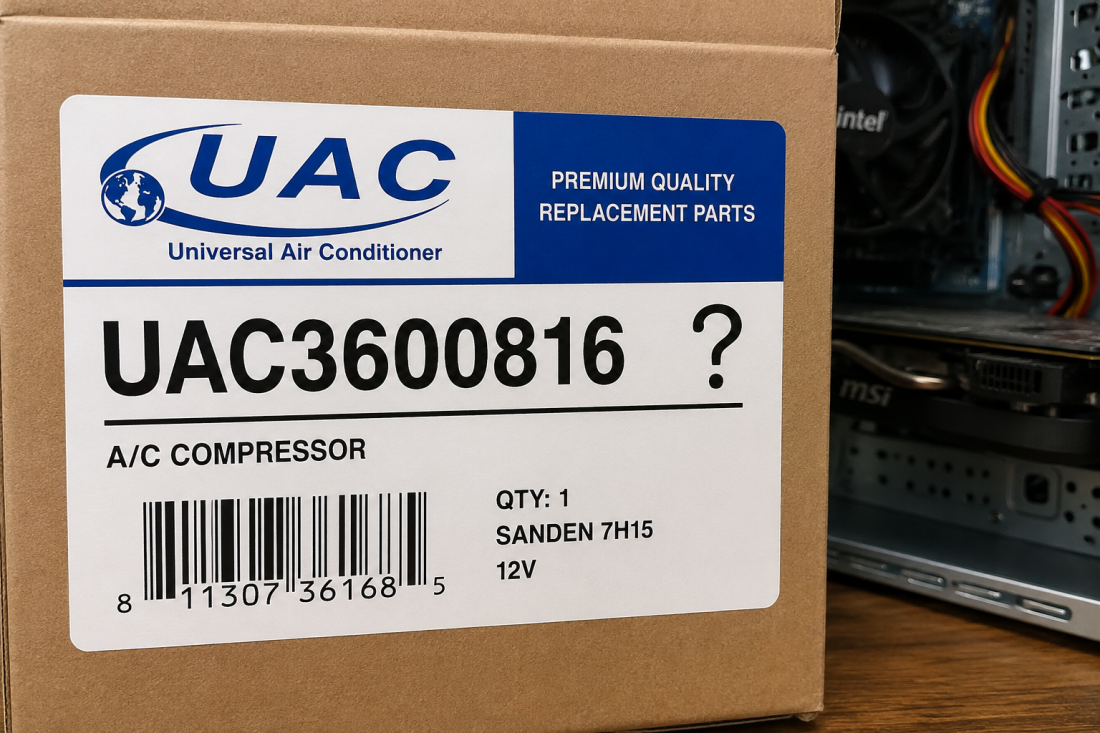
Chances are you have seen the code UAC3600816 somewhere: on a screen, an invoice, a report. You’ve searched it and got a different answer from every page you opened. One called it a database identifier. One called it an air conditioning part. One called it a corporate security platform on a media platform site.
The short version: UAC3600816 is not a catalogued error code. No software vendor or manufacturer publishes it. But two real systems are abbreviated UAC, and one of them is almost certainly behind whatever you saw.
This article helps you work out which of the two you’re dealing with, and then gives you the documented fix for each.
What UAC3600816 Actually Is
No manufacturer and no software vendor publishes an error code called UAC3600816. It doesn’t appear in Microsoft’s error documentation, and it doesn’t appear in Universal Air Conditioner’s parts catalogue. The pages that rank for it contradict each other: a database identifier on one, a replacement HVAC part on another, a corporate access platform on a third — because none of them is working from a published source.
What the search does return is two genuinely different systems that share the abbreviation UAC, surrounded by pages that matched the string rather than explained it.
There are three realistic reasons you’re looking at this code. You misread or mistyped a longer number, and a digit or a letter prefix went missing along the way. You copied it from a page that generated it rather than documented it. Or it’s an internal reference from one company’s own system—a ticket ID, an asset tag, a record number that was never meant to be publicly searchable.
None of those means your computer is broken; now take a deep breath.
Before you go further: never approve a User Account Control prompt you didn’t trigger yourself, whatever code is on the screen. If you didn’t start anything, click No.
Why the format itself is a clue
Neither real UAC system issues codes in this shape.
Universal Air Conditioner part numbers use a short letter prefix followed by digits: CO 29002C for a compressor, CN 3026PFC for a condenser, RD 1801C for an accumulator, KT 5028 for a kit. The brand name isn’t part of the number. “UAC” plus seven digits doesn’t match how that catalogue is built.
Windows User Account Control doesn’t generate numbered error codes at all. Windows problems that involve UAC surface as hexadecimal values like 0x80070005, as Windows Installer errors like Error 1730, or as KB article numbers such as KB5063878. A UAC-prefixed string isn’t among the formats Windows uses.
A code matching neither published format is usually a transcription error or an internally generated reference. That won’t tell you the answer outright, but it narrows the field considerably — and it rules out the two places most people start looking.
The Two Real Systems Called UAC
Two organisations abbreviate to UAC, and they have nothing to do with each other. One sells car parts. The other is built into Windows. Where you saw the code decides which one you need.
Universal Air Conditioner, Inc.
Universal Air Conditioner is an aftermarket automotive air conditioning brand, founded in 1988. It supplies compressors, condensers, evaporators, accumulators, driers, hose assemblies and complete repair kits for cars and heavy-duty trucks.
Its numbers turn up everywhere — on repair invoices, in parts catalogues, on eBay and Amazon listings, on RockAuto. That’s the usual route to a search like this one: someone half-remembers a number from a receipt and types it into Google as a “UAC code”. UAC A/C parts are sold through the manufacturer’s own catalogue at uacparts.com and through resellers.
Windows User Account Control
User Account Control is the Windows security feature that dims your screen and asks for permission — or an administrator password — before an app makes changes to the system. That box is UAC.
So what is UAC for? It stops software from quietly gaining administrator rights. A program that wants to install a driver, write to protected folders or change system settings has to ask, and you have to agree. Malware that can’t get past the prompt can’t make itself permanent.
Most people meet UAC in Windows as a prompt, not as an error. That matters here. If a permission box and a stray number were on screen at the same time, they were probably unrelated, and the prompt is the part worth understanding.
| Universal Air Conditioner | Windows User Account Control | |
|---|---|---|
| What it is | Automotive A/C parts brand | Windows security feature |
| Where you’d see it | Invoices, parts catalogues, listings, packaging | On-screen permission prompt, Event Viewer, IT support tickets |
| Code format used | Letter prefix + digits (CO 29002C, KT 5028) | Hex codes (0x8007…), installer errors (1730), KB numbers |
| Who to ask | Parts supplier or mechanic | Microsoft Support or your IT admin |
| Does it use “UAC3600816”? | Not in the published catalogue | No — UAC doesn’t issue codes in this format |
How to Tell Which One You’re Looking At
Four questions, one minute.
- Where did you see it? On a computer screen, or on paper — an invoice, a box, a parts listing? That answer alone usually settles it.
- If it was on a screen: was there a shield icon, a dimmed background, or a request for an administrator password? That’s Windows User Account Control. The prompt is real; the number next to it came from somewhere else.
- If it was on an invoice, box, listing or catalogue: you’re looking at a parts number. Go back to the physical component or the original order and read the exact string, letters included.
- If it was neither — a company portal, a work system, an internal report — it’s an internal reference. The only reliable answer is the organisation that generated it. Ask your IT desk, your account manager, or whoever sent you the document. No search result can tell you what another company’s internal code means.
Windows problem, read the next section. Parts number, skip to the one after it.
Fixes for Windows User Account Control Problems
Everything below is documented by Microsoft. If UAC has started behaving differently than it used to, start at the top.
Unexpected admin prompts after a Windows update
If the prompts began after an update, there’s a documented cause. The August 12, 2025 Windows security updates — KB5063878 for Windows 11 and KB5063709 for Windows 10 — hardened Windows Installer to close CVE-2025-50173, a local privilege-escalation flaw.
The hardening worked, and it also caught ordinary activity. Standard, non-administrator users began seeing admin prompts they’d never seen, and MSI repair operations failed, sometimes with Error 1730.
Microsoft lists the affected actions: MSI repair commands, first-run configuration after signing into an app, Active Setup, and Configuration Manager deployments. Autodesk AutoCAD was hit hardest.
Microsoft then narrowed the behaviour twice. The September 2025 update limited when elevation is required and gave administrators an allowlist for specific MSI packages. Updates released on and after October 28, 2025 refined it again, so a prompt appears only when elevated custom actions actually run during a repair.
So install every pending Windows update. For apps without those custom actions, that resolves it. If you need the program working now, right-click and choose Run as administrator. The Known Issue Rollback Group Policy offered earlier is no longer needed. And note what Microsoft’s fix doesn’t include: switching UAC off.
Changing how often UAC prompts you
Windows gives you a four-position slider. Open Control Panel, go to User Accounts, then Change User Account Control settings.
At the top, Always notify covers both apps trying to make changes and changes you make to Windows settings yourself. Below it sits the default, which prompts for apps only. Third does the same without dimming the desktop. At the bottom, Never notify, the prompts stop appearing.
You’ll need administrator rights to move it, and a restart to apply the change. What each position costs you is covered further down.
When UAC blocks an app you trust
Right-click the program and choose Run as administrator. Before you approve anything, read the publisher name in the prompt — a properly signed application shows a verified publisher, an unsigned one doesn’t. On a managed work device, contact IT rather than changing settings yourself.
A prompt naming a publisher you don’t recognise, or one that appears when you haven’t started anything, is a reason to click No.
Fixes for a UAC Part Number That Won’t Resolve
If a UAC part number doesn’t return any search results, it usually isn’t because the part is fake or discontinued. More often, the number has been copied incorrectly, entered without its letter prefix, or taken from an internal inventory label rather than the manufacturer’s official part number.
This commonly happens when numbers are handwritten on workshop invoices, read from worn stickers, or copied from old service records. A missing letter, swapped digit or extra space is enough to stop manufacturer databases and retailer searches from finding a match.
It’s also worth remembering that different numbers can appear on the same component. A warehouse stock code, supplier reference, vehicle manufacturer’s number and the genuine UAC part number may all be printed on the box or paperwork. Searching the wrong identifier can make it seem as though the part doesn’t exist when it does.
Before assuming the number is invalid, double-check every character exactly as printed. Even a single incorrect digit can return no results—or worse, lead you to a completely different part that looks similar but isn’t compatible with your vehicle.
Finding the real part number
Start with the component. The number is usually stamped or printed on the part itself or on its box. Failing that, check the original invoice or order confirmation — suppliers list the full manufacturer number.
The letter prefix is what people drop, and it’s easy to misread on a printed label or a worn stamping. CO, CN, EV, RD, EX and KT are all real UAC prefixes, and digits recorded without their letters won’t return anything useful. Search the complete string, letters included, in the manufacturer’s catalogue at uacparts.com.
Cross-referencing and confirming fitment
Retailers including RockAuto and FinditParts let you search by part number or by vehicle year, make and model, and will show equivalent parts from other brands. Use both. Confirm by vehicle rather than trusting the number alone, because one mistyped digit can return a real part that doesn’t fit your car.
Kits complicate this. A listing like the UAC KT 5028 A/C compressor and component kit bundles a compressor with several other components, each carrying its own number — which is why a single repair can put half a dozen numbers on one invoice. If the number still won’t resolve, call the supplier who sold it to you.
Pros and Cons of Each Approach
| Approach | Pros | Cons |
|---|---|---|
| Install the latest Windows updates | Resolves the documented prompt issue at source; keeps the security fix in place | Requires a restart; managed work devices may not allow it |
| Run as administrator (one-off) | Immediate; changes nothing permanently | Has to be repeated every time; needs admin credentials |
| Lower the UAC prompt level | Fewer interruptions | Weakens a real security control; not advisable on a shared or work machine |
| Turn UAC off entirely | Stops all prompts | Microsoft advises against it; removes protection against silent privilege escalation |
| Ask IT or the supplier | Gets a definitive answer for internal or unresolvable codes | Slower than searching |
| Verify a part by vehicle, not number | Avoids ordering a part that doesn’t fit | Takes longer than copying a number |
There is no fix for UAC3600816 itself, because there’s nothing there to fix. The repair belongs to whatever you actually have in front of you.
For the Windows prompt issue, updating is the only option that addresses the cause. The rest work around it.
Run as administrator is fine once. It gets tedious if the app needs it every morning, and it’s no use at all without admin credentials.
Lowering the slider buys quiet at a genuine price. On a shared or company machine, that’s the wrong trade to make.
Turning UAC off stops every prompt, which is exactly the problem — it also stops the ones that would have warned you. Microsoft advises against it, and nothing in this situation justifies it.
Asking IT or a parts supplier feels slow. For an internal code it’s the only route to a definitive answer, and searching harder won’t produce one.
Verifying a part by vehicle costs a few minutes and saves you a return, a second order and a car with no air conditioning in the meantime.
How to Check an Unknown System Code Yourself
This method works on any code you can’t place.
Search the exact string in quotation marks. That forces an exact match, so you see pages genuinely containing the code rather than pages that matched a fragment of it.
Then go to the source. Check the vendor’s own support site or product catalogue — Microsoft Support for a Windows code, the manufacturer’s catalogue for a part. If the vendor doesn’t list it, you have your answer.
Compare the format against codes that the vendor does publish. Formats stay consistent inside a system, and a mismatch tells you plenty.
Then weigh what you found. A page that defines a code confidently without citing a catalogue, a support article or a vendor advisory is guessing.
Frequently Asked Questions
Is UAC3600816 a virus or a sign my computer is infected?
No. It isn’t a malware indicator and it isn’t a Windows error code, so seeing it doesn’t mean anything is wrong. A real warning sign looks different: a User Account Control prompt naming a publisher you don’t recognise, appearing when you haven’t started anything.
What does UAC stand for?
Two things. In automotive parts, UAC is Universal Air Conditioner, a brand of aftermarket air conditioning components. In Windows, UAC is User Account Control, the security feature that asks permission before an app changes your system. Invoices mean the first; screens mean the second.
Why do different websites give completely different answers for UAC3600816?
Because there’s no published definition, so pages fill the gap with guesses. One calls it a UAC cyber security platform, another an HVAC component, another a database key. A reliable answer cites something checkable — a manufacturer catalogue or a vendor support page.
Should I turn off User Account Control to stop the prompts?
No, for almost everyone. UAC is what stops software gaining administrator rights without your knowledge, and Microsoft’s documented fix for the prompt issue is installing the latest Windows updates rather than disabling the feature. Update first; the prompts usually stop.
How do I find the correct UAC part number for my car?
Check the part or its packaging for the full number including its letter prefix — CO, CN, EV, RD, EX or KT. Then confirm it against your vehicle’s year, make and model in the manufacturer’s catalogue at uacparts.com or through a retailer’s cross-reference search.
UAC3600816 Conclusion
UAC3600816 isn’t a catalogued error code, so there’s nothing to repair under that name. Identify which system produced what you saw, and fix that.
If it was a Windows screen, install every pending update — later updates resolved the August 2025 prompt issue, and updating is the fix Microsoft actually recommends.
If it came off an invoice or a box, look up the full part number with its letter prefix at uacparts.com, then confirm fitment by vehicle.
If it came out of a company system, ask the company. They’re the only ones who can tell you what it means.